- Published on
Prompt Caching Quick Reference Cheat Sheet
- Authors

- Name
- Anablock
AI Insights & Innovations
Prompt Caching Quick Reference Cheat Sheet
🚀 Quick Start
Enable Caching (TypeScript)
const response = await client.messages.create({
  model: 'claude-3-5-sonnet-20241022',
  max_tokens: 1024,
  system: [
    {
      type: 'text',
      text: 'Your system prompt...',
      cache_control: { type: 'ephemeral' }  // ← Add this
    }
  ],
  messages: [...]
});
Enable Caching (Python)
response = client.messages.create(
    model="claude-3-5-sonnet-20241022",
    max_tokens=1024,
    system=[
        {
            "type": "text",
            "text": "Your system prompt...",
            "cache_control": {"type": "ephemeral"}  # ← Add this
        }
    ],
    messages=[...]
)
📊 Key Metrics
| Metric | Value | |--------|-------| | Cache Lifetime | 60 minutes | | Minimum Tokens | 1,024 tokens | | Max Breakpoints | 4 per request | | Speed Improvement | Up to 85% faster | | Cost Reduction | ~90% on cached tokens |
💰 Pricing (Claude 3.5 Sonnet)
| Type | Cost per 1M tokens | |------|-------------------| | Regular Input | $3.00 | | Cache Write | $3.75 (+25%) | | Cache Read | $0.30 (-90%) | | Output | $15.00 |
🎯 When to Use Caching
✅ Good Use Cases:
- Same document, multiple questions
- Consistent system prompts
- Repeated tool definitions
- Multi-turn conversations
- Batch processing with shared context
❌ Poor Use Cases:
- One-off requests
- Constantly changing content
- Very short prompts (<1024 tokens)
- Requests >1 hour apart
🔧 Common Patterns
Pattern 1: Cache System Prompt + Tools
// TypeScript
const tools = [...];  // Your tools
const toolsWithCache = tools.map((tool, idx) =>
  idx === tools.length - 1
    ? { ...tool, cache_control: { type: 'ephemeral' } }
    : tool
);

const response = await client.messages.create({
  system: [
    {
      type: 'text',
      text: systemPrompt,
      cache_control: { type: 'ephemeral' }
    }
  ],
  tools: toolsWithCache,
  messages: [...]
});
# Python
def add_cache_to_tools(tools):
    tools_clone = tools.copy()
    last_tool = tools_clone[-1].copy()
    last_tool["cache_control"] = {"type": "ephemeral"}
    tools_clone[-1] = last_tool
    return tools_clone

response = client.messages.create(
    system=[
        {
            "type": "text",
            "text": system_prompt,
            "cache_control": {"type": "ephemeral"}
        }
    ],
    tools=add_cache_to_tools(tools),
    messages=[...]
)
Pattern 2: Cache Document in Messages
// TypeScript
const messages = [
  {
    role: 'user',
    content: [
      {
        type: 'text',
        text: `Document:\n\n${document}`,
        cache_control: { type: 'ephemeral' }  // Cached
      },
      {
        type: 'text',
        text: question  // Not cached - changes each request
      }
    ]
  }
];
# Python
messages = [
    {
        "role": "user",
        "content": [
            {
                "type": "text",
                "text": f"Document:\n\n{document}",
                "cache_control": {"type": "ephemeral"}  # Cached
            },
            {
                "type": "text",
                "text": question  # Not cached
            }
        ]
    }
]
Pattern 3: Multi-Level Caching
// Cache hierarchy: Tools → System → Document → Question
const response = await client.messages.create({
  tools: addCacheToLastTool(tools),  // Breakpoint 1
  system: [
    {
      type: 'text',
      text: systemPrompt,
      cache_control: { type: 'ephemeral' }  // Breakpoint 2
    }
  ],
  messages: [
    {
      role: 'user',
      content: [
        {
          type: 'text',
          text: document,
          cache_control: { type: 'ephemeral' }  // Breakpoint 3
        },
        {
          type: 'text',
          text: question  // Not cached
        }
      ]
    }
  ]
});
📈 Reading Cache Metrics
Response Usage Object
{
  "usage": {
    "input_tokens": 750,
    "cache_creation_input_tokens": 1772,  // First request
    "cache_read_input_tokens": 1772,      // Subsequent requests
    "output_tokens": 350
  }
}
What Each Means
| Field | Meaning |
|-------|---------||
| input_tokens | Fresh tokens processed |
| cache_creation_input_tokens | Tokens written to cache (first request) |
| cache_read_input_tokens | Tokens read from cache (subsequent) |
| output_tokens | Response length |
Calculate Cache Hit Rate
const cacheHitRate =
  (usage.cache_read_input_tokens /
   (usage.input_tokens + usage.cache_read_input_tokens)) * 100;

console.log(`Cache hit rate: ${cacheHitRate.toFixed(1)}%`);
⚠️ Common Pitfalls
❌ Pitfall 1: Content Changed Slightly
// Request 1
const doc = "Analyze this document.";

// Request 2
const doc = "Analyze this document!";  // Added "!" - cache miss!
Fix: Keep cached content identical.
❌ Pitfall 2: Using Shorthand Format
// Wrong - no place for cache_control
messages: [
  { role: 'user', content: 'Hello' }
]

// Correct - longhand format
messages: [
  {
    role: 'user',
    content: [
      {
        type: 'text',
        text: 'Hello',
        cache_control: { type: 'ephemeral' }
      }
    ]
  }
]
❌ Pitfall 3: Below Token Threshold
// Too short - won't cache
system: "You are helpful."  // ~50 tokens

// Better - combine elements to exceed 1024 tokens
system: [detailed_instructions] + [examples] + [guidelines]
❌ Pitfall 4: Reordering Tools
// Request 1
tools = [toolA, toolB, toolC]

// Request 2
tools = [toolB, toolA, toolC]  // Different order - cache miss!
Fix: Maintain consistent tool order.
🔍 Debugging Cache Issues
Check if Cache is Working
// TypeScript
function analyzeCacheUsage(usage: Anthropic.Usage): void {
  if (usage.cache_creation_input_tokens) {
    console.log('✓ Cache created:', usage.cache_creation_input_tokens, 'tokens');
  }

  if (usage.cache_read_input_tokens) {
    console.log('✓ Cache hit:', usage.cache_read_input_tokens, 'tokens');
  }

  if (!usage.cache_creation_input_tokens && !usage.cache_read_input_tokens) {
    console.log('⚠️  No caching occurred - check:');
    console.log('  - Content is >1024 tokens');
    console.log('  - cache_control is set');
    console.log('  - Using longhand format');
  }
}
# Python
def analyze_cache_usage(usage):
    if usage.cache_creation_input_tokens:
        print(f"✓ Cache created: {usage.cache_creation_input_tokens} tokens")

    if usage.cache_read_input_tokens:
        print(f"✓ Cache hit: {usage.cache_read_input_tokens} tokens")

    if not usage.cache_creation_input_tokens and not usage.cache_read_input_tokens:
        print("⚠️  No caching occurred - check:")
        print("  - Content is >1024 tokens")
        print("  - cache_control is set")
        print("  - Using longhand format")
💡 Pro Tips
- Cache Warming: Make a dummy request to populate cache before real traffic
- Refresh Before Expiry: Schedule cache refresh every 50 minutes
- Monitor Hit Rates: Track
cache_read_input_tokensto measure effectiveness - Use Defensive Copying: Clone tools/prompts before adding cache control
- Combine with Redis: Two-tier caching for maximum efficiency
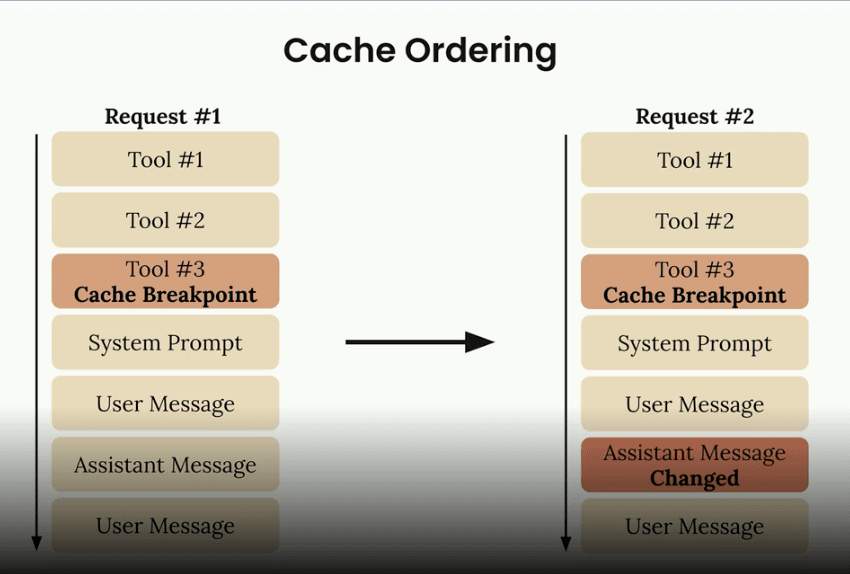
📚 Processing Order
Claude processes components in this order:
- Tools (if provided)
- System prompt (if provided)
- Messages (in order)
Place breakpoints strategically based on what changes:
- Tools rarely change → cache first
- System prompt changes daily → cache second
- Messages change per request → cache selectively
🎓 Quick Decision Tree
Do you send the same content repeatedly?
├─ No → Don't use caching
└─ Yes
   ├─ Is content >1024 tokens?
   │  ├─ No → Combine elements or skip caching
   │  └─ Yes
   │     ├─ Requests within 1 hour?
   │     │  ├─ No → Consider cache warming
   │     │  └─ Yes → ✅ Use caching!
🔗 Quick Links
📋 Checklist for Production
- [ ] System prompt uses longhand format with
cache_control - [ ] Tools have cache control on last tool
- [ ] Content exceeds 1,024 token minimum
- [ ] Cached content is identical across requests
- [ ] Monitoring cache hit rates
- [ ] Handling cache expiry gracefully
- [ ] Testing with real usage patterns
- [ ] Documented caching strategy for team
Print this cheat sheet and keep it handy while implementing prompt caching!